
Voice Daily ReportsLog the Day Without Typing a Word
On a noisy site at end of day, the last thing you want to do is fill out a form. Just speak naturally — PlanSpan AI transcribes your voice and automatically fills in labour counts, equipment hours, weather, and work performed.
The problem
Why Daily Reports Don't Get Done
Nobody Has Time at End of Day
By the time the crew is packing up, the superintendent is dealing with closeout, safety checks, and tomorrow's prep. Sitting down to type a report feels like one more thing on an already full plate.
Typing on a Phone Is Slow
Entering labour counts, equipment types, hours, and work descriptions one field at a time on a phone keyboard is tedious — especially with dirty gloves and a small screen.
Reports Written Later Lose Detail
The longer the gap between the work and the report, the less accurate the documentation. Waiting until the office means details get forgotten, quantities get guessed, and photos get lost.
What PlanSpan does
Speak It While It's Fresh
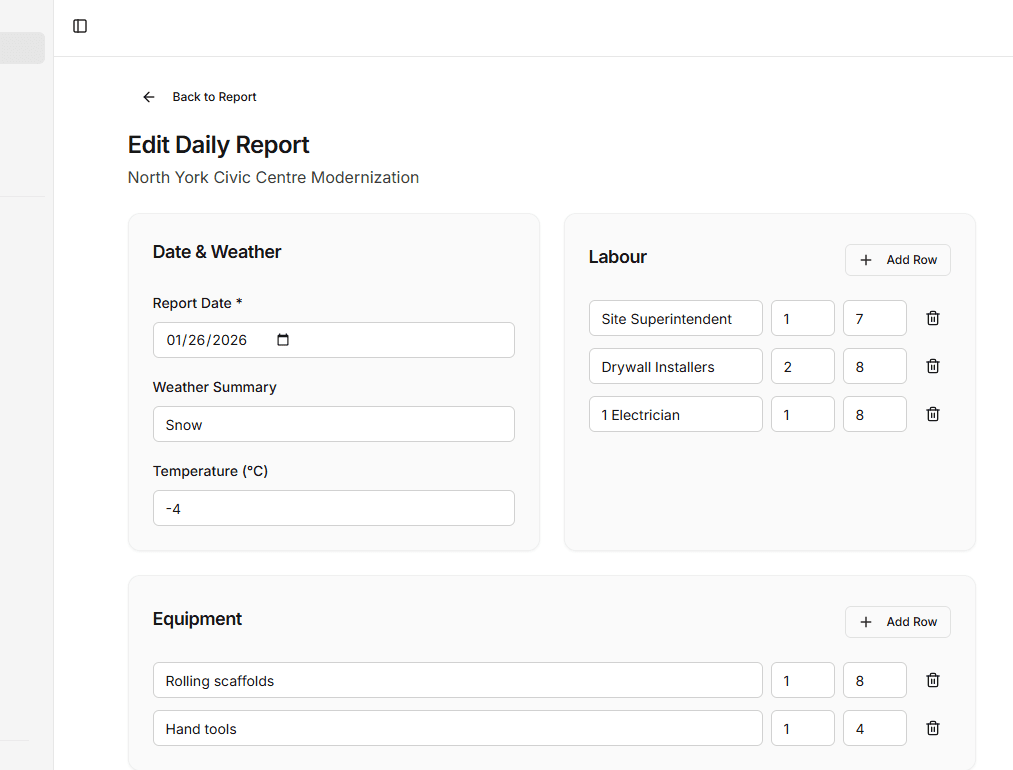
PlanSpan voice logging uses AI to transcribe your natural speech and automatically populate all report fields — labour by trade, equipment hours, weather conditions, and work performed. One voice note. One complete report.
Voice to Report
Speak naturally while you walk the site. AI fills in all the structured report fields from your words.
Smart Field Extraction
AI picks out trade names, headcounts, equipment types, and work activities from conversational speech — no special format required.
Works With Photos
Attach site photos to your voice report and AI helps connect the observations to the visual documentation.
PDF-Ready Instantly
Your voice-logged report becomes a professional branded PDF in one click — ready to share with the GC or owner.
How it works
Up and runningon your next project.
- 1
Tap the Mic Button
Open PlanSpan on your phone and tap the voice log button — no typing needed
- 2
Speak Your Notes
Describe what happened on site naturally — trades, equipment, work performed, weather, issues
- 3
Review and Publish
AI fills all the report fields from your voice — review in seconds and publish the completed report
Daily reporting
Related guides
- Construction daily reportsWhat to record each day and why it protects you.
- Daily report appLog labour, equipment, weather and work from site.
- Mobile daily reportsFill in reports and photos from your phone.
- Daily report PDFsBranded PDF reports ready to send.
- Daily report software for contractorsReporting built for general and trade contractors.
- AI weekly and monthly reportsTurn daily logs into summaries automatically.
- Free daily report templateA ready-to-use daily report template.
Get started
Your Best Daily Report Takes 60 Seconds
Start with one project and its drawings and specifications.